

Prepare a control set
Take the Paper 26.3 and Java 25 project. In plugin.yml add permissions: → trailnotes.snapshot: → default: op. Grant this right only to the test account via lp user ВашНик permission set trailnotes.snapshot true, then remove it via permission unset.
Before the experiment, put the named enchanted tool in the hotbar, armor in the appropriate slots and a shield in the off hand. Record the quantity and location. PlayerInventory includes armor and additional slots; saving only storage contents does not cover them.
Save item copies, then read them back from disk
Replace the main class with the complete code below. /invsnapshot save writes YAML with name UUID; check compares the saved array with the current one. Each ItemStack is cloned rather than stored as a reference to a changing item.
package ru.example.trailnotes;

import java.io.File;
import java.util.ArrayList;
import java.util.Arrays;
import java.util.List;
import org.bukkit.command.Command;
import org.bukkit.command.CommandSender;
import org.bukkit.configuration.file.YamlConfiguration;
import org.bukkit.entity.Player;
import org.bukkit.inventory.ItemStack;
import org.bukkit.plugin.java.JavaPlugin;

public final class TrailNotesPlugin extends JavaPlugin {
    @Override public void onEnable() {
        registerCommand("invsnapshot", (source, args) -> snapshot(source.getSender(), args));
    }
    private void snapshot(CommandSender sender, String[] args) {
        if (!sender.hasPermission("trailnotes.snapshot")) {
            sender.sendMessage("Нет права trailnotes.snapshot.");
            return;
        }
        if (!(sender instanceof Player player)) {
            sender.sendMessage("Нужен игрок с контрольным инвентарём.");
            return;
        }
        if (args.length != 1 || !(args[0].equals("save") || args[0].equals("check"))) {
            sender.sendMessage("/invsnapshot save|check");
            return;
        }
        File file = new File(getDataFolder(), player.getUniqueId() + ".yml");
        try {
            getDataFolder().mkdirs();
            if (args[0].equals("save")) {
                List<ItemStack> items = new ArrayList<>();
                for (ItemStack item : player.getInventory().getContents())
                    items.add(item == null ? null : item.clone());
                YamlConfiguration yaml = new YamlConfiguration();
                yaml.set("contents", items);
                yaml.save(file);
                player.sendMessage("Снимок записан: " + file.getName());
            } else {
                YamlConfiguration yaml = new YamlConfiguration();
                yaml.load(file);
                List<?> list = yaml.getList("contents");
                if (list == null) throw new IllegalArgumentException("Нет contents");
                ItemStack[] saved = new ItemStack[list.size()];
                for (int i = 0; i < list.size(); i++) {
                    Object item = list.get(i);
                    if (item != null && !(item instanceof ItemStack))
                        throw new IllegalArgumentException("Неверный предмет в слоте " + i);
                    saved[i] = item == null ? null : ((ItemStack) item).clone();
                }
                boolean same = Arrays.equals(saved, player.getInventory().getContents());
                player.sendMessage(same ? "Все слоты совпадают." : "Инвентарь отличается от снимка.");
            }
        } catch (Exception error) {
            player.sendMessage("Снимок не прочитан или не записан. Вещи не изменены.");
            getLogger().warning(error.getClass().getSimpleName() + ": " + file.getName());
        }
        return;
    }
}
Check properties, slots and restart
Execute save, then check - a match is expected. Rearrange the item and check the difference. Return the item to its place, change its name and check the difference again. Restore the test suite, exit, shut down the test server via stop and once started, run check.
This experience does a small diagnostic read and write synchronously. Bulk processing cannot be added to a game tick: first capture the data in the game context, then pass the isolated view to the limited I/O queue.
Safe restoration needs an owner and a journal
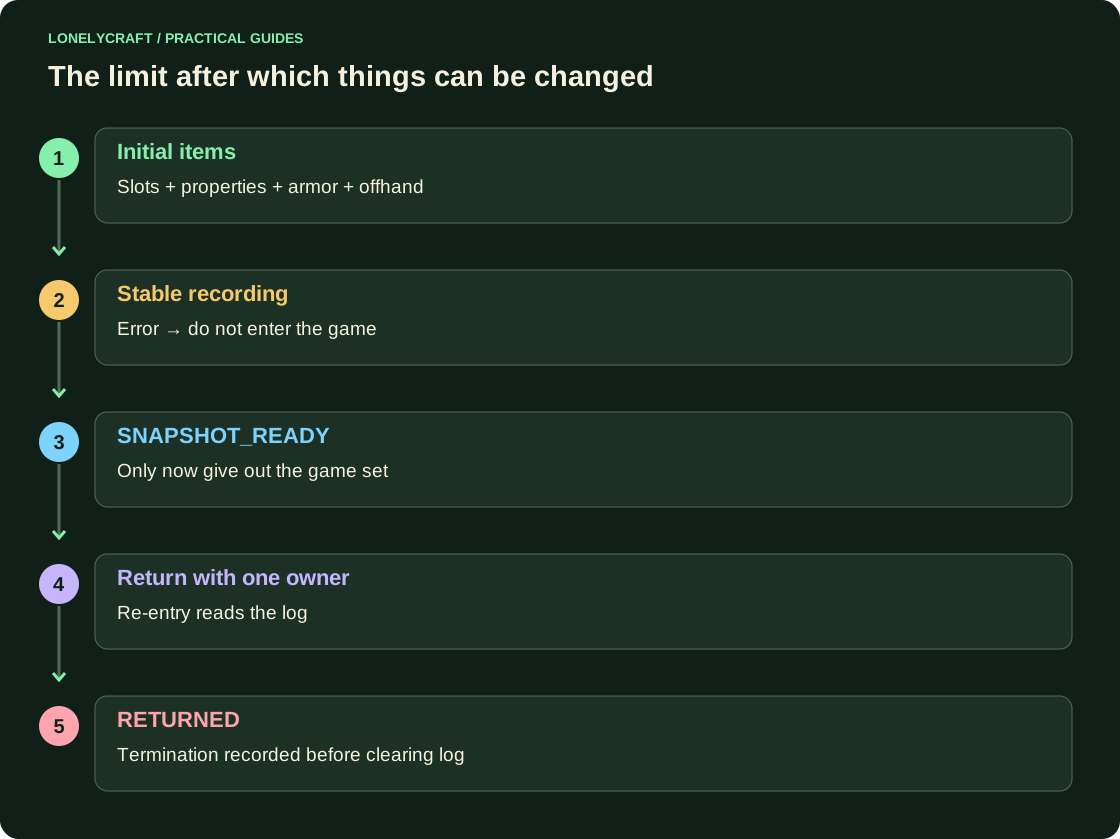
Before cleaning, save the original items and the SNAPSHOT_READY stage permanently. Recording failed - entry into the game is canceled without changing things. When logging in again, restore using the saved stage, and not using the HashMap that disappeared after the restart.
Only one component should return normal inventory. If the world inventory manager is installed, coordinate the transition with it. The above snapshot does not include health, experience, hunger, effects, mode and position. For a pause, the game equipment is stored separately from the original one.
Transitions specify a valid action after each failure. Disassemble unfinished input and output.
I/O transfer requires session verification before applying the result. Limit background recording.