

Register BasicCommand
Take minimal project with Paper 26.3 and Java 25. Replace the main class with the given code. command is registered via registerCommand to onEnable; the commands section in plugin.yml is not needed for this path. Official BasicCommand is for simple commands.
In 26.3 the former CommandExecutor is marked obsolete. It is still found in plugins, but the new example uses the current version API. We will declare Permission separately: this is not an OP issue.
package ru.example.trailnotes;
import io.papermc.paper.command.brigadier.BasicCommand;
import io.papermc.paper.command.brigadier.CommandSourceStack;
import org.bukkit.command.CommandSender;
import org.bukkit.entity.Player;
import org.bukkit.plugin.java.JavaPlugin;

public final class TrailNotesPlugin extends JavaPlugin {
    @Override public void onEnable() {
        registerCommand("trailinfo", new BasicCommand() {
            @Override public String permission() { return "trailnotes.info"; }
            @Override public void execute(CommandSourceStack source, String[] args) {
                CommandSender sender = source.getSender();
                if (!sender.hasPermission("trailnotes.info")) return;
                if (args.length == 1 && args[0].equalsIgnoreCase("help")) {
                    sender.sendMessage("/trailinfo — UUID; /trailinfo help — справка.");
                    return;
                }
                if (args.length != 0) {
                    sender.sendMessage("Использование: /trailinfo [help]");
                    return;
                }
                if (!(sender instanceof Player player)) {
                    sender.sendMessage("Нужен игрок. Используйте trailinfo help.");
                    return;
                }
                player.sendMessage("Ваш UUID: " + player.getUniqueId());
            }
        });
    }
}
Declare the permission in the manifest
In the existing plugin.yml, add the following top-level section. default: true makes this informational command available to the normal player; for administrative operation, select a separate node with default: op. Check the right to execute, even if the menu button has already been hidden.
permissions:
  trailnotes.info:
    description: Показывать свой UUID
    default: true
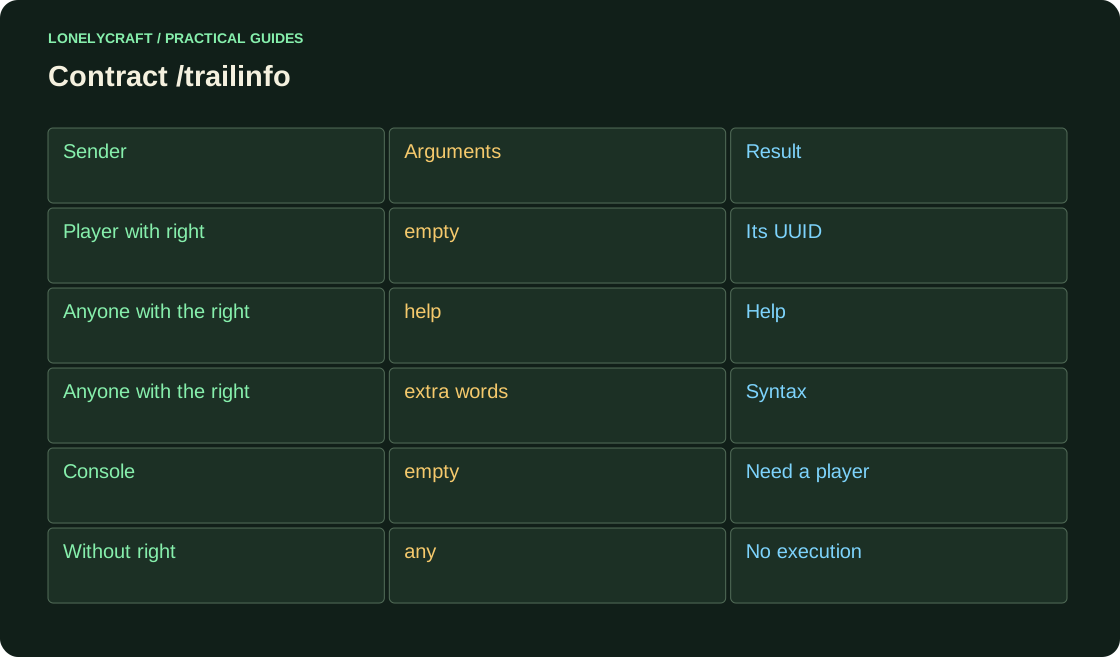
Try command with different senders
After the test Paper is assembled and running normally, check the following inputs. To check the ban in the LuckPerms console, run lp user ВашНик permission set trailnotes.info false; then delete the temporary rule via lp user ВашНик permission unset trailnotes.info.
| Enter | Answer |
|---|---|
| Player: /trailinfo | UUID of this player |
| Player: /trailinfo help | Help |
| Player: /trailinfo help extra | Use without exception |
| Console: trailinfo | Explanation that a player is needed |
| Console: trailinfo help | Help |
Add arguments without hidden actions
Before changing the game, check the exact number of arguments, then the type and range. For example, the string -5 is parsed as an int, but a negative quantity of the product is still not allowed. Autocompletion helps with typing, but the user can manually submit an arbitrary string.
If the short name is taken by another plugin, check /trailnotes:trailinfo. Do not promise a successful purchase until the transaction is completed; direct the button and command to the same service with the same permission.
The world context and personal ban can overlap the group. Find out the source of LuckPerms permission.
A monetary transaction requires a stored result, not just a command message. Confirm issue after commit.