

Pin Java, Gradle and the API
In IntelliJ IDEA, create a Java project with a Gradle Kotlin DSL named TrailNotes. Select JDK 25. In the project terminal, execute java -version and ./gradlew --version: Java launch Gradle and compiler toolchain - different settings. To run Gradle in Java, 25 requires version 9.1.0 or later; reconciliation - in Gradle matrix.
In settings.gradle.kts save rootProject.name = "TrailNotes"; The contents of build.gradle.kts are shown below. Paper API build 238 for 26.3 is pinned here. This is an educational fixed build, not a promise of the latest version. The new coordinate scheme is confirmed by Paper Project setup.
plugins { java }
group = "ru.example"
version = "1.0.0"
repositories {
    mavenCentral()
    maven("https://repo.papermc.io/repository/maven-public/")
}
dependencies {
    compileOnly("io.papermc.paper:paper-api:26.3.build.238-stable")
}
java { toolchain.languageVersion.set(JavaLanguageVersion.of(25)) }
tasks.withType<JavaCompile>().configureEach { options.encoding = "UTF-8" }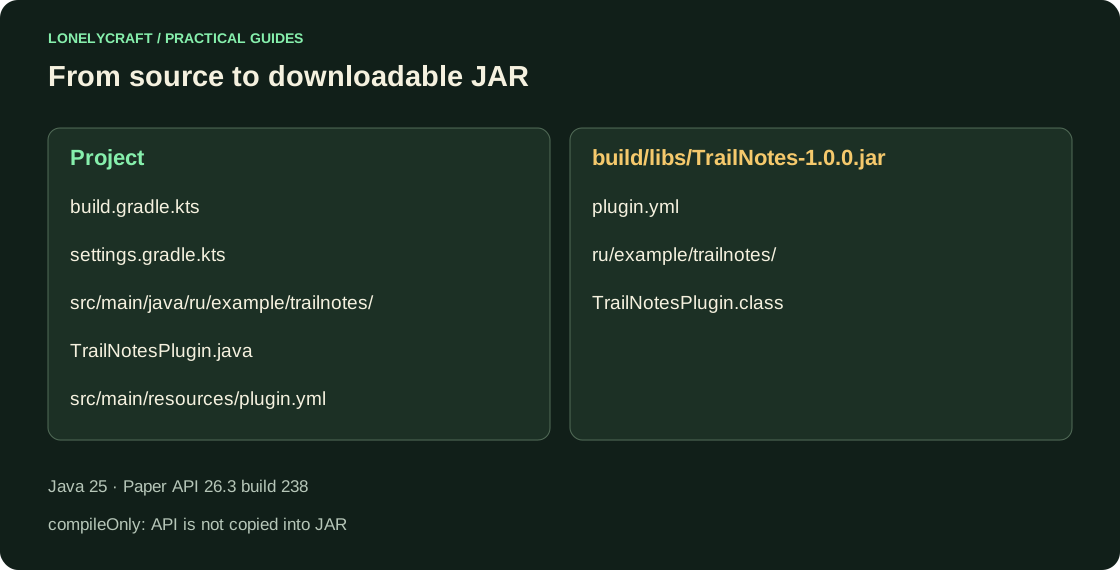
Create a Java Class and Resource
The file src/main/java/ru/example/trailnotes/TrailNotesPlugin.java contains the code below. The package path and main in manifest must match character by character, including case.
package ru.example.trailnotes;

import org.bukkit.plugin.java.JavaPlugin;

public final class TrailNotesPlugin extends JavaPlugin {
    @Override
    public void onEnable() {
        getLogger().info("TrailNotes загружен");
    }
}
Put the manifest at the archive root
Create src/main/resources/plugin.yml with this content. api-version specifies the minimum server API, not the Java version. On Paper older than 26.3, this example intentionally does not load. The remaining fields are described in the manifest directory.
name: TrailNotes
version: 1.0.0
main: ru.example.trailnotes.TrailNotesPlugin
api-version: "26.3"
Check the build before installing it
From root, execute ./gradlew clean build and jar tf build/libs/TrailNotes-1.0.0.jar. On Windows, use ./gradlew.bat clean build. The archive needs plugin.yml and ru/example/trailnotes/TrailNotesPlugin.class; The server will not load the ZIP containing the project folder.
On the stopped test Paper, replace the old TrailNotes JAR with a single new file. Start the server with Java 25, find TrailNotes загружен in logs/latest.log, terminate via stop and restart. You need one line to enable the plugin.
| Message | What to check |
|---|---|
| UnsupportedClassVersionError | Java real server process, not just terminal IDE |
| Cannot find main class | package, class name, main and path inside the JAR |
| Invalid plugin.yml | Resource location, YAML and file extension |
| Could not resolve paper-api | Access to official Maven and exact dependency coordinates |
After successful loading, you can check the arguments and permissions of the command. Add first command.
A separate test directory allows you to test a new build without losing a working plugin. Install and rollback JAR.