Check platform and origin
In the server console, run version. For Paper, download the Bukkit build from LuckPerms official page, not Velocity or Fabric. Record the name, version and URL in plugins-installed.txt. For other plugins, check with its author for Java requirements and dependencies.
In Linux sha256sum LuckPerms-Bukkit.jar, in PowerShell Get-FileHash ./LuckPerms-Bukkit.jar -Algorithm SHA256 allow you to compare the same file when transferring. Substitute a valid JAR name. A hash does not prove the reliability of an unknown source.
Install a single copy
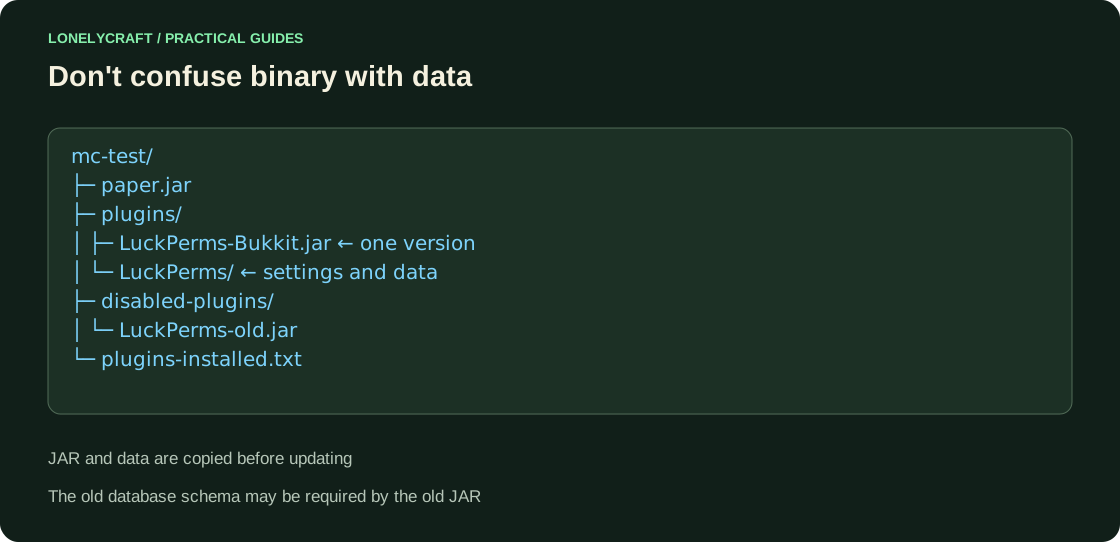
In the test server console, run stop and wait for the process to complete. Open the plugins folder next to the JAR you are running and copy the file there without extracting it. Move the previous version outside of plugins.
Start the server normally and read the first error message in logs/latest.log if the plugin does not start. Paper Plugin Guide discusses compatibility and dependencies; the list of JARs in the folder does not confirm loading.
Check commands, files and restart
In the console, run lp info: LuckPerms should respond. Find the created plugins/LuckPerms/config.yml. For the first experiment, leave the standard local storage; Connect a separate external database only with its own check.
Exit with stop, run again and repeat lp info. If you changed the rights data, check that they are saved after logging in with a regular account. A command error can mean not only a missing plugin, but also a name conflict or access restriction.
Undo the change without losing data
If the added plugin does not work, on a stopped test, move only its JAR to the adjacent disabled-plugins. Save the data folder. Don't automatically remove a shared dependency that other plugins use.
When updating an existing plugin, make sure to save the old JAR and a consistent copy of the data in advance. If the new version has migrated the schema, replacing one binary is not a rollback: the old code may need the old base. Transfer the same tested file to the production server.
After loading, check the real right, and not just the presence of command. Check out the first group of LuckPerms.
Migration may make the data incompatible with the previous JAR. Agree on code and data rollback.