

Open the folder of the desired world
In the Java client: “Single player” → select world → “Customize” → “Open world folder”. Close world before copying. On the server, look for the level-name value in server.properties and the corresponding world directory.
Create datapacks/demo in it. Inside there will be pack.mcmeta and data/demo/function/hello.mcfunction. For ZIP, pack.mcmeta should also be located immediately in the root, and not under the external demo folder.
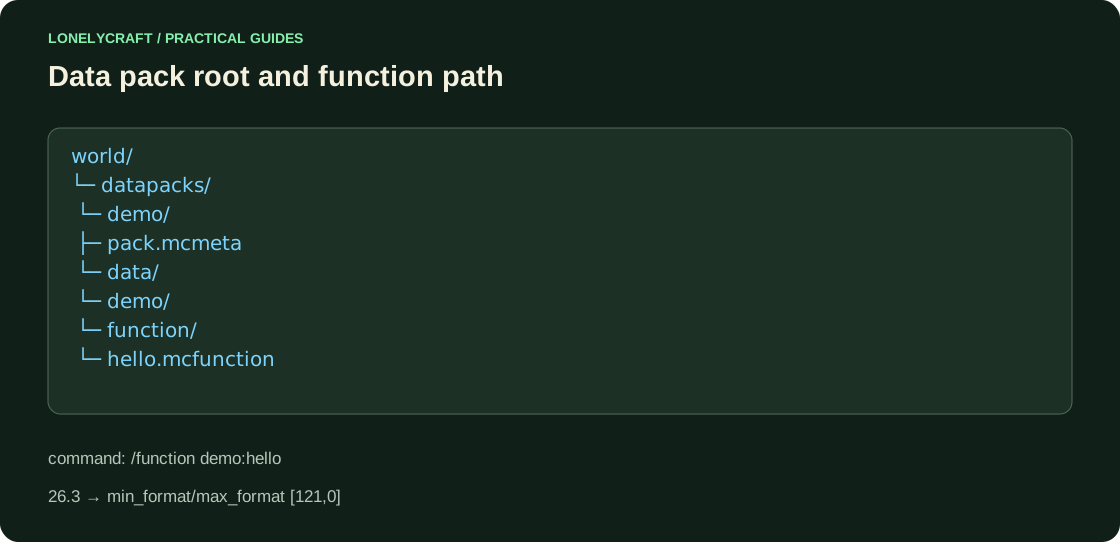
Declare compatibility with 26.3
The official release 26.3 specifies the data pack format 121.0. The min_format/max_format range scheme is introduced in Java1.21.9. Save the resulting JSON as datapacks/demo/pack.mcmeta.
This is a narrow example of 26.3. For an older release, do not copy the number 121: compatibility is also determined by the command and data structure. Enable display of file extensions to avoid pack.mcmeta.txt.
{
  "pack": {
    "description": "Проверка demo:hello для Java26.3",
    "min_format": [121, 0],
    "max_format": [121, 0]
  }
}
Create and execute a function
In data/demo/function/hello.mcfunction, write the following line without the leading slash. Open world with commands enabled or use the server console. Execute /datapack list enabled, then /function demo:hello. On Paper in the console, commands are written without a slash.
If you added files while the server was running, vanilla data reload is /minecraft:reload; it is not a way to update JAR plugins. After reload, read the log, then retry the function. The Datapack loaded message is expected.
say Datapack loadedDetermine at what level the package failed to load
The package is not listed - check the correct world, ZIP root and pack.mcmeta syntax. The package exists, the function is unknown - check the namespace demo, singular function, name and extension .mcfunction. Don't use the functions folder from the old example.
Before installing a generation or command that changes world, save a copy. Removing a package will remove definitions, but will not cancel already delivered blocks and created chunks.
Full refund requires condition prior to package application. Save world before changing data.
Correct JSON or YAML does not prove content compatibility. Separate syntax from the meaning of settings.