

Recognize your window by its owner
On Paper 26.3 and Java 25 use TrailNotes project. The main class below registers /safemenu itself; manifest remains basic. The native InventoryHolder binds the server inventory to the Menu object. The title may be the same as another window, so it is not suitable for testing.
The rule in the example is intentionally strict: while the window is open, operations in both the top and bottom inventory are prohibited. This is an information screen, not a ready-made store.
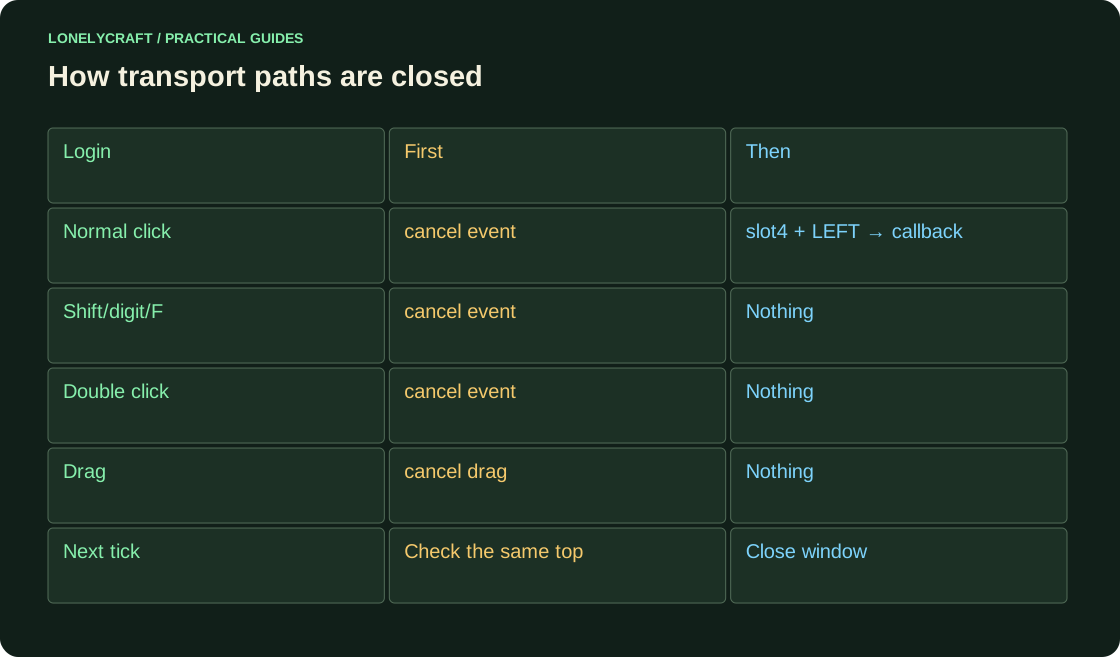
Handle click and drag separately
Replace the main Java file with this class. Any click in our window is first canceled; Only then is the button recognized. Closing is moved to the next tick according to the InventoryClickEvent contract. The same top inventory object is checked before closing.
package ru.example.trailnotes;

import org.bukkit.Bukkit;
import org.bukkit.Material;
import org.bukkit.command.Command;
import org.bukkit.command.CommandSender;
import org.bukkit.entity.Player;
import org.bukkit.event.EventHandler;
import org.bukkit.event.Listener;
import org.bukkit.event.inventory.ClickType;
import org.bukkit.event.inventory.InventoryClickEvent;
import org.bukkit.event.inventory.InventoryDragEvent;
import org.bukkit.inventory.Inventory;
import org.bukkit.inventory.InventoryHolder;
import org.bukkit.inventory.ItemStack;
import org.bukkit.plugin.java.JavaPlugin;

public final class TrailNotesPlugin extends JavaPlugin implements Listener {
    private static final class Menu implements InventoryHolder {
        private final Inventory inventory = Bukkit.createInventory(this, 9, net.kyori.adventure.text.Component.text("Безопасное меню"));
        @Override public Inventory getInventory() { return inventory; }
    }
    @Override public void onEnable() {
        getServer().getPluginManager().registerEvents(this, this);
        registerCommand("safemenu", (source, args) -> openMenu(source.getSender()));
    }
    private void openMenu(CommandSender sender) {
        if (!(sender instanceof Player player)) {
            sender.sendMessage("Меню открывается игроку.");
            return;
        }
        Menu menu = new Menu();
        menu.inventory.setItem(4, new ItemStack(Material.PAPER));
        player.openInventory(menu.inventory);
        return;
    }
    @EventHandler public void click(InventoryClickEvent event) {
        Inventory top = event.getView().getTopInventory();
        if (!(top.getHolder() instanceof Menu)) return;
        event.setCancelled(true);
        if (event.getRawSlot() != 4 || event.getClick() != ClickType.LEFT) return;
        Player player = (Player) event.getWhoClicked();
        getServer().getScheduler().runTask(this, () -> {
            if (!player.isOnline() || player.getOpenInventory().getTopInventory() != top) return;
            player.closeInventory();
            player.sendMessage("Кнопка сработала; предмет остался в меню.");
        });
    }
    @EventHandler public void drag(InventoryDragEvent event) {
        if (event.getView().getTopInventory().getHolder() instanceof Menu) {
            event.setCancelled(true);
        }
    }
}
Try to take the button item out in different ways
Install the JAR into the test Paper. Place a regular item in the hotbar, open /safemenu and follow all the steps below. After closing and re-entering, the number of items should remain the same.
| Action | Waiting |
|---|---|
| Left click in slot4 | The window is closed, PAPER is not issued |
| Shift-click from lower inventory | No transfer |
| Hotbar number or F above the button | No exchange |
| Double click with an item on the cursor | No button collection |
| Drag through top slots | No layout |
Don't confuse window protection with payment
Two clicks before the next tick can deliver two callbacks. The first one will close the window; the second one will see another top inventory and exit. For the background, additionally store the UUID and opening number - the same window should not accept the result of the old request.
If you add a purchase, check the permission, current price and full-inventory policy before withdrawing money. Durable transaction records and retry-safe delivery are separate concerns. Blocking shift-click does not make a payment execute only once.
The request number filters the result after exiting or changing the screen. Don't apply answer to old window.
The replay check must survive a server restart. Save the fact of purchase.