Download the archive and start the server
On the official BDS page select a stable build for the system, read the current requirements and license. Extract to an empty folder C:\MinecraftServer or ~/MinecraftServer. The loading page requirements take precedence over the old example in Learn.
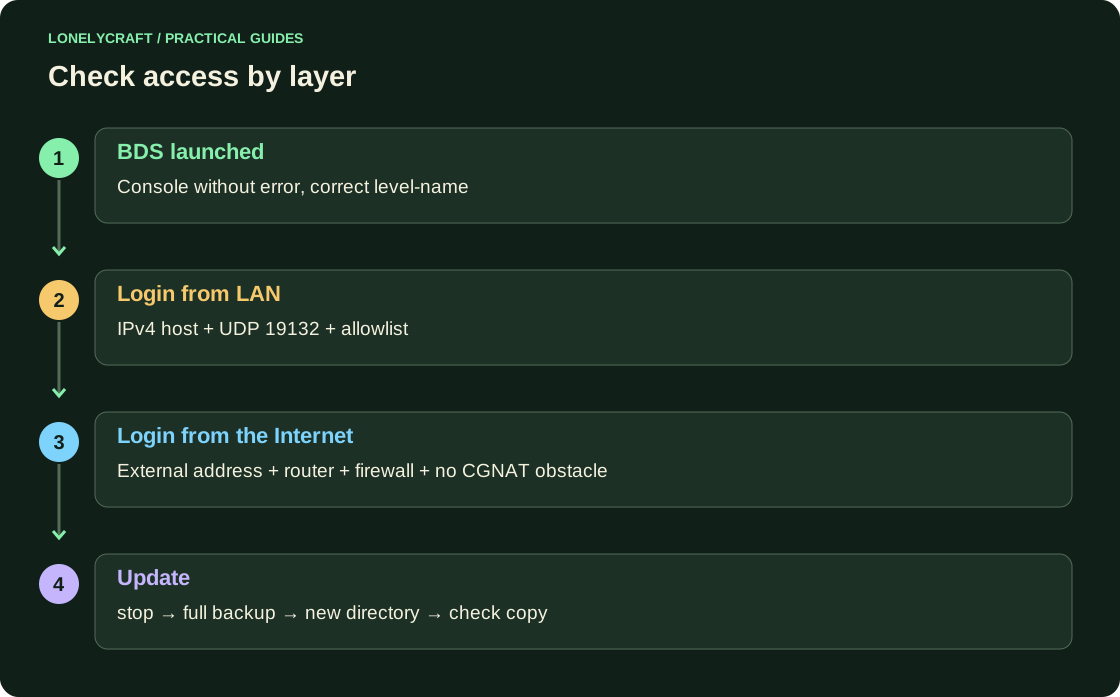
On Windows, open PowerShell in this folder and run .\bedrock_server.exe. On Ubuntu, run LD_LIBRARY_PATH=. ./bedrock_server. Wait for the startup message, then enter stop in the console. Edit the configuration after the process is complete.
Set up private access
In server.properties, change the lines below, keeping the rest of the delivery settings. After launch, add the participant in the console: allowlist add "Exact GamerTag". Substitute his exact Xbox GamerTag. After manually editing allowlist.json, run allowlist reload.
server-name=LonelyFriends
level-name=LonelyFriends
gamemode=survival
difficulty=normal
allow-list=true
online-mode=true
default-player-permission-level=member
server-port=19132
server-portv6=19133
Connect from another device
Find the IPv4 of the active adapter: Windows ipconfig, Ubuntu ip -4 addr. On a phone or Windows Bedrock on the same network, open Play → Servers → Add server, address for example 192.168.1.20, port 19132. Replace the example numbers with your own.
In the firewall, allow incoming UDP 19132 for the desired network; the configured IPv6 uses UDP 19133. Check that the client and server version are the same compatible. Guest Wi-Fi can isolate devices. Additional loopback restrictions are possible for the client and BDS on the same Windows computer: check the individual device first.
Only then allow internet access
An external player needs an external address, UDP permission in the firewall and appropriate router forwarding. Internal 192.168... does not work outside your network. With CGNAT, regular forwarding is not enough: check with your provider about the availability of incoming connections or use hosting. Consoles may not have a standard form for adding a custom server.
Before upgrading, stop BDS and save all worlds, server.properties, allowlist.json, permissions.json and packages. Check the new archive in a separate directory on a copy of world. After logging in, check your inventory, containers, and restart.
Check the recovery before updating. Copy of Bedrock-world.
Compare BDS with LAN, Realms and Shared Server. Other ways to play with friends.