Choose an external storage method
Before working, exit world and wait for it to save. On Windows, open edit for the desired world, find Export World and save .mcworld outside the game directory. If the button is not available on your platform or version, use a supported transfer through Realms or an available full copy of the files.
Make a backup on a second drive or in a cloud folder and wait for loading to complete. The name Survival-2026-11-04-before-addon.mcworld explains what world it is and what it is saved in front of. Don't name all files backup.zip: it's easy to choose the wrong one when restoring.
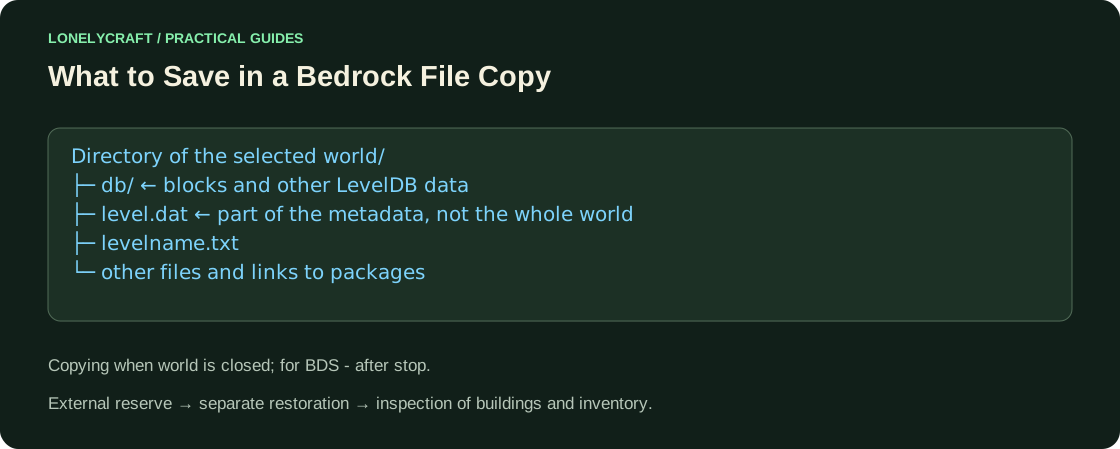
When copying files you need the whole world
If you have file access, copy the entire world directory when the game is closed. Bedrock stores data also in the db directory; one level.dat does not contain buildings. The directory name may be unreadable: check the world name according to its data and date, do not select the first folder.
For BDS, a reliable, simple way is to execute stop, wait for the process to complete, then save worlds/<level-name>, configuration, and behavior/resource packs used. Do not archive the live database as a regular static folder. OS access restrictions vary on phones; do not delete the application in the hope that world is automatically stored in the account.
A separate server has its own directories and settings. world on BDS.
Restore a separate copy
Open the exported mcworld through Minecraft and wait for it to import. If you are restoring files, place a copy in the appropriate world directory of the private client. Give the test copy a distinct name and do not overwrite the source.
Check the spawn point, several buildings in different places, chests, personal inventory, measurements and the operation of the necessary packages. Exit, open the copy again and make sure that the test change you made is saved. The very fact that world appears in the list does not check its base.
How often to back up
Keep a separate version before upgrading, new Add-Ons and major ports. For a long world, it is convenient to store several dates rather than replacing a single file every day. If corruption is found, stop updating the last good reserve until checking. Copy World remains a convenient quick insurance within the application, but complements the external file.
Launch new mechanics on a separate copy first. Behavior Pack Check.