A layout for mining
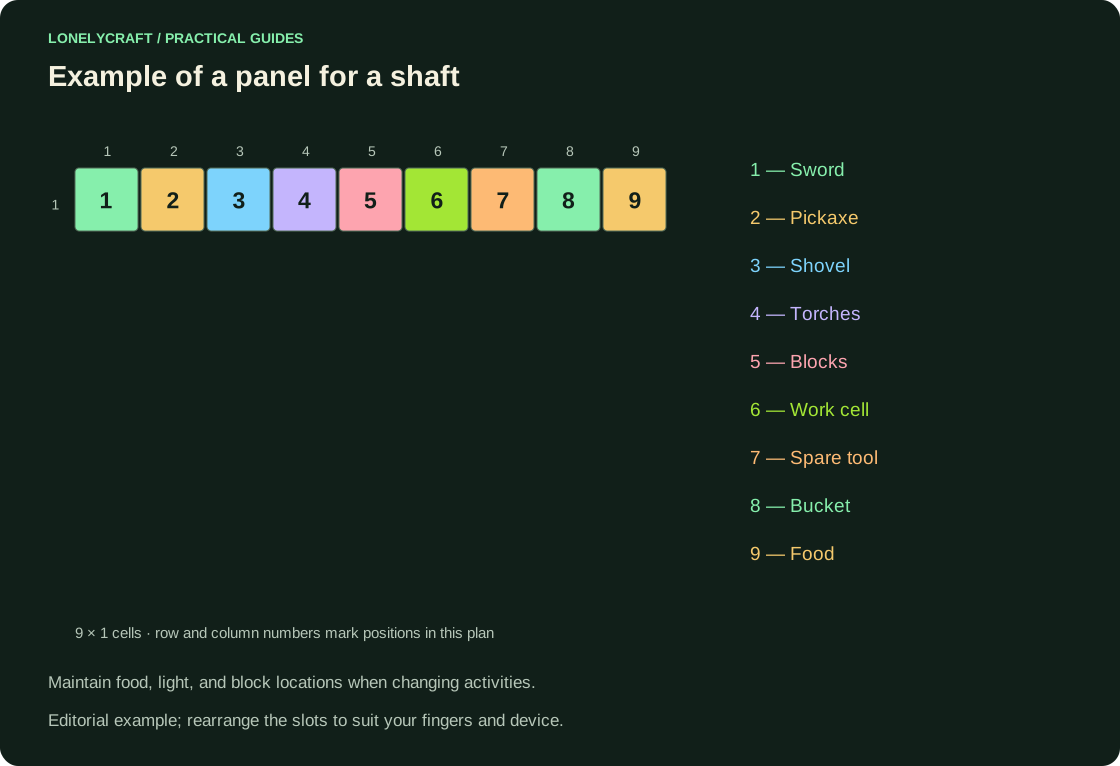
Suggested order: sword, pickaxe, axe/shovel, torches, building blocks, free work slot, spare tool, bucket, food. This is an example and not a required layout. The main thing is not to rearrange the food and blocks each time you return.
In the mine, keep a supply of light and blocks for exit; in a construction site, replace unnecessary weapons with stage materials, but leave an emergency kit. Before descending, make sure that the selected cell contains a block and not a valuable item that will accidentally be thrown away.
Three Java Actions That Save Time
First check the combination in a regular chest with cheap material. The server GUI can intercept clicks and apply its own actions: do not use blind bulk transfer in the buy menu. On the phone, the actions depend on the selected scheme.
| Action | Standard combination | Where is it useful? |
|---|---|---|
| Quick stack transfer | Shift + LMB | Chest ↔ inventory |
| Take half a stack | RMB on a stack | Share supplies among friends |
| Issue one at a time | RMB on a cell with an item in the cursor | Lay out fuel or ingredients |
| Move to hotbar | Point at the item and press 1–9 | Attach the tool to the desired slot |
Unload in a consistent order
When you return, first remove rare items and expedition results, then arrange common resources, replenish food and torches, and replace worn-out tools. At the end, leave open cells and materials for the next specific task. This way you won’t have to go through all the chests a second time.
The "disassemble" chest is useful as a temporary buffer if it has a limit: for example, to empty before the next trip. If every trip ends with a new, nameless chest, the problem is already in the storage scheme.
Give categories clear, permanent locations. Vault signatures.
Why items do not stack
Different durability, name, enchantments, or server data can make similar icons appear as different items. Check the clue before throwing it away. Some items have a lower stacking limit or don't stack at all.
The bag is convenient for small miscellaneous leftovers, and the shulker is for a separate set of things; These are different packaging methods. Do not hide the entire emergency supply inside a container that is inconvenient to open in a dangerous moment. Leave food, light, and blocks immediately available.
The quick access kit should help you get back, not just get it. Mine preparation.