Give the team design constraints
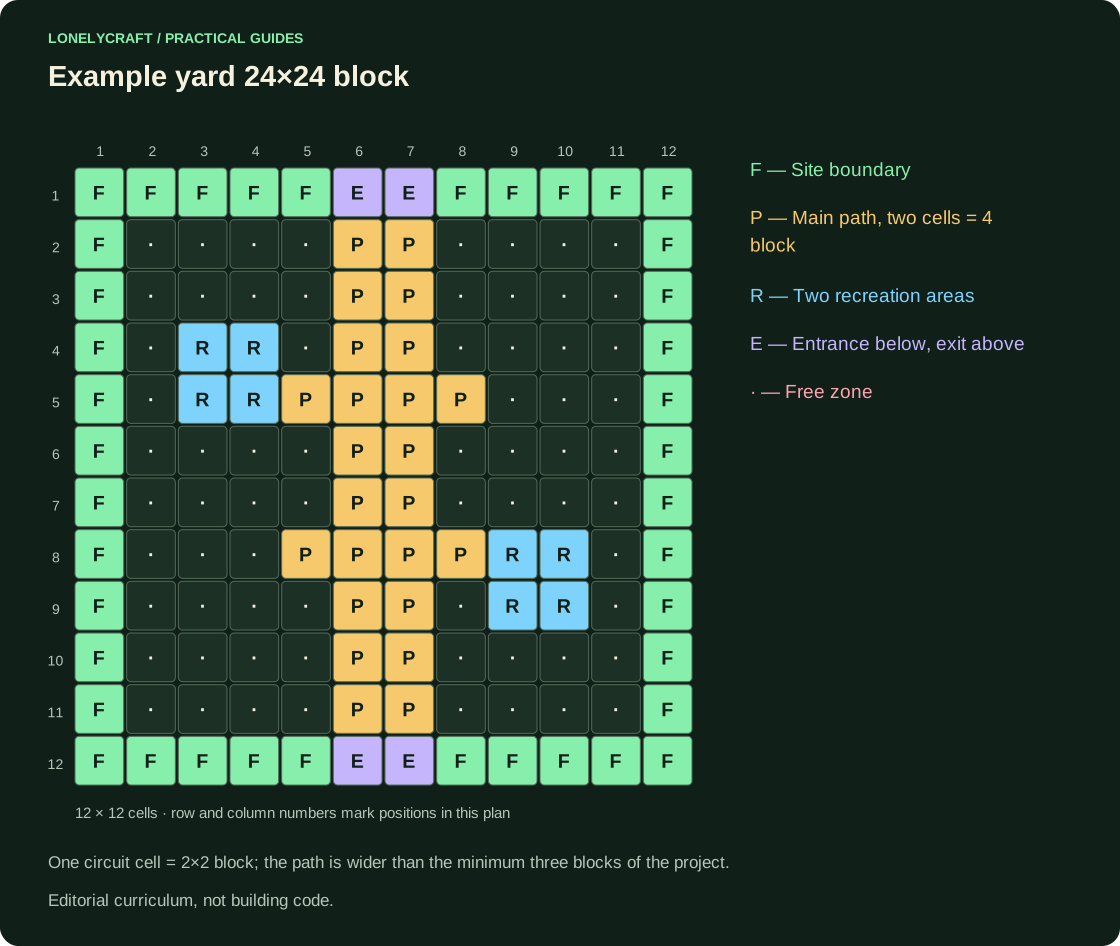
Proposed editorial design: section 24×24 block, one entrance, stepless main path with a minimum width of 3 block, two stopping places and a clear exit. Participants explain how a visitor gets directions. These are the teaching conventions of the model, not the norms for constructing a real public space.
Before class, check the same edition, participant access and the ability to save the world. Regular Bedrock and Minecraft Education are different products; Don't expect free co-entry or identical features. Enable Education learning tools only after separately checking the required license and platform.
Plan for 45 minutes
| Time | Action | Result |
|---|---|---|
| 0–5 min | Discuss visitor and restrictions | One common task |
| 5–12 min | Mark the entrance, path and zones with two block colors | Passable scheme without finishing |
| 12–30 min | Build fences, signs, rest areas | Rough model |
| 30–38 min | Invite a test visitor without prompts | Recording stops and wrong turns |
| 38–45 min | Fix one flaw and explain the change | Before/after comparison |
Roles and verification without prompts
In a team of three, one person plans the route, another builds and the third tests and takes screenshots. Switch roles halfway through: a tester is more likely to notice decorations blocking the path. Do not assign separate plots without a shared plan, or their connections may not line up.
The tester comes in from the entrance and says out loud where he is going to go. The authors remain silent and write down points of doubt. If it arrived only after a voice prompt, the navigation has not yet been verified. For a small group, the same person tests two versions from the same starting point.
What to evaluate and save
Check three things: every required area is accessible; decorative details do not block the route; and the team can connect a specific design decision to a test observation. Counting attractive blocks is not a substitute for an explanation.
Save an overall top view, a screenshot of the problematic turn and the revised version. Each participant writes two sentences explaining what did not work and what they changed. Test world export or backup before the next lesson.
Save the training model outside of a single device. Reserve Bedrock-world.
How to make direction clear in the game space. Landmarks and maps.