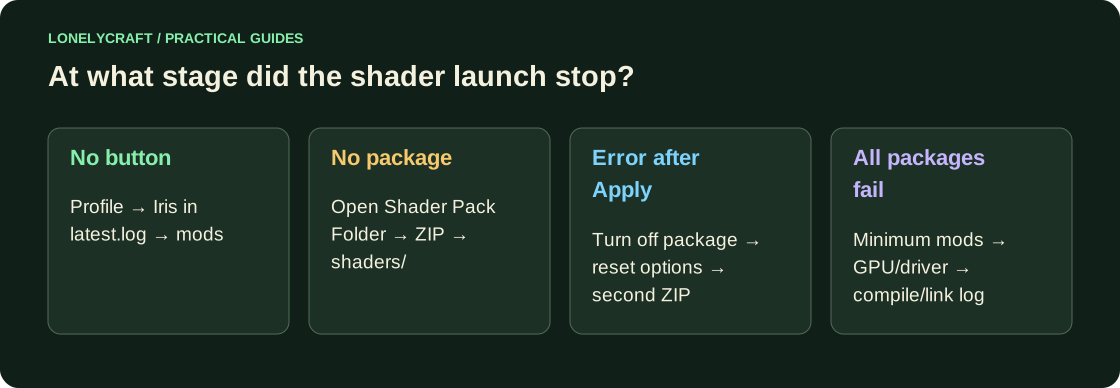
There is no Shader Packs button
Check the selected launcher installation and its Game Directory. Sodium without Iris does not add a shader loader. Open logs/latest.log of this particular profile and find Iris in the list of downloaded mods. If it is not there, check mods, the game version and the loader.
The individual profile and compatible components are discussed here. Installing Iris.
There is a button, but the ZIP is not visible
Open Shader Packs → Open Shader Pack Folder. This directory should contain the finished ZIP release. Take a look at the archive: the folder shaders is expected, and not another archive or directory with installer sources. Do not rename .jar to .zip: the extension does not turn the mod into a shader.
After Apply the picture broke
If the menu is available, turn off shader in the Shader Packs screen and apply. If nothing is readable, close the game and temporarily move the problematic ZIP from shaderpacks to another folder. Run without it, then check in the file and reset the package options before trying again.
Test the second package on default settings. If one is broken, the problem is most likely related to it or its combination with the driver. If both, temporarily leave only Iris, compatible Sodium and the necessary dependencies, disable resource packs. In particular, resource packs that replace core shaders have limitations in Iris.
What do the lines in the log mean?
Immediately after the failure, copy logs/latest.log, otherwise the next launch will replace it. Look for compile, link, GL_INVALID, OpenGL, ERROR and the program name, such as composite or gbuffers_terrain. Save 20–40 adjacent lines: the phrase “shader failed” alone explains almost nothing.
A GLSL compilation error means that the graphics program did not build; This is not proof of a lack of RAM. The OpenGL error number also does not indicate the culprit by itself. Attach Minecraft version, Iris, Sodium, ZIP, OS, GPU model and driver. The Iris documentation describes additional debugging capabilities for package developers.
Check your GPU model and known limitations on Sodium's driver page. Get the Windows driver from NVIDIA, AMD or Intel; On macOS, the graphics driver is updated along with the system. If the hardware feature is not supported, another ZIP or regular graphics is more useful than reinstalling Java.
When the failure appears only in the full assembly, reduce the set by dependent groups. Finding mod conflicts.