

First select the client version
Write down the full game number in the launcher. The server core number does not determine the version of graphic mods on the computer. This setting is not suitable for a browser client.
| Client | Verified edition of Iris | What to consider |
|---|---|---|
| 1.20.4 / Fabric | 1.7.2+1.20.4 | The changelog shows support for Sodium 0.5.11 |
| 1.21.1 / Fabric | 1.8.8+1.21.1-fabric | Its own dependency branch; not Sodium 0.5.11 |
| 26.3 / Fabric | 1.11.7+26.3-fabric | Separate release; take the dependencies of this file |
To play without installation, use separate instructions. Minecraft in the browser.
Installer and game directory
Open Iris official page: Windows EXE or Universal JAR. Close the launcher, run the installer, select Minecraft Version and Install. It installs Iris along with Sodium. If the issue you need is not on the list, do not choose the next one at random.
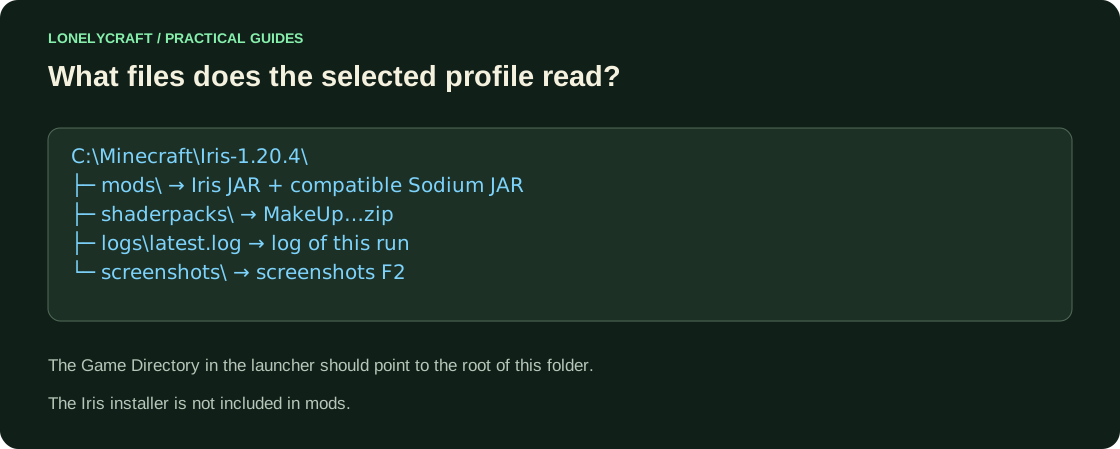
Open Java Edition → Preferences → created Iris installation → Edit → More options. In Game Directory, set it to a separate directory, for example C:\Minecraft\Iris-1.20.4. Run the profile to the menu and close: this will create its files. In a third-party launcher, open the folder of the selected instance.
If you already use Fabric, put Iris 1.7.2 for 1.20.4 and compatible Sodium 0.5.11 for that game in the profile’s mods folder. Do not leave a second copy of Sodium or add OptiFine. For a different client version, choose its matching Iris release.
Add the ZIP and check the result
Open Settings → Graphics Settings → Shader Packs → Open Shader Pack Folder. This is the most reliable way to find the shaderpacks folder you are using. Download the finished ZIP from MakeUp releases, put it there without unpacking, select the package and click Apply.
Wait for the compilation, then look at the water, leaves and shadow of the building. Disable the package and enable it again: the change should be visible in the same scene. Start with a low preset. If the screen is black, first turn off the shader; Increasing memory usually doesn't help here.
Different check branches for missing button, empty list and compilation error. Diagnostics shader.
