Create two files
On Windows, press Win+R and open %appdata%\Minecraft Bedrock\users\shared\games\com.mojang. In development_resource_packs, create FirstTextures. This is the way of the stable modern client from Microsoft lesson; Preview uses individual data.
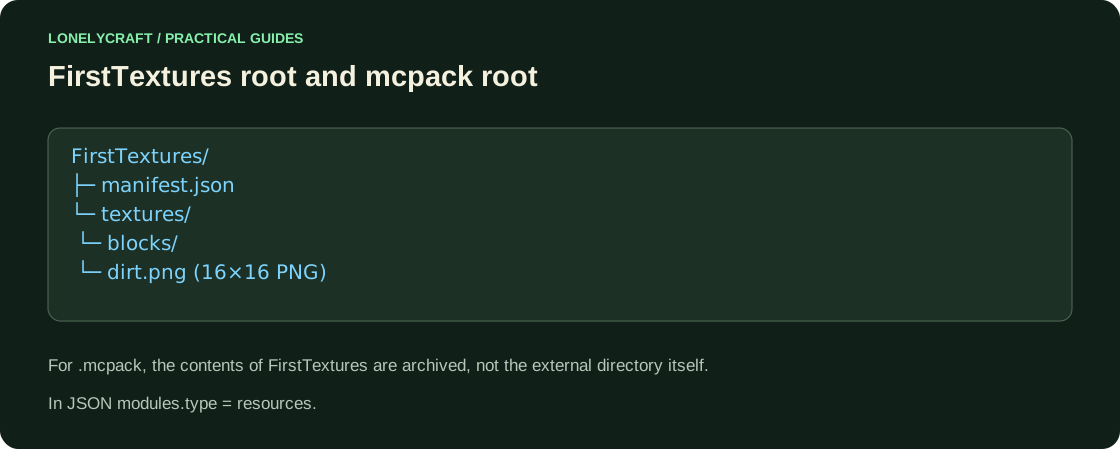
Inside you need manifest.json and textures/blocks/dirt.png. For the first test, draw a PNG 16×16 with a bright diagonal. The name dirt.png is sensitive to the exact path; do not write texture, block or dirt.png.png.
Package manifest
Save the code as UTF-8 JSON without comments. In Explorer, turn on show extensions to avoid getting manifest.json.txt. The two UUIDs are different: one identifies the package, the other identifies the module. For your own redistributable project, replace both; For a normal update, keep the package identity and increase the version.
{
  "format_version": 2,
  "header": {
    "name": "FirstTextures",
    "description": "Учебный пакет LonelyCraft",
    "uuid": "dd4e99d9-bb31-4d3b-9c2b-2f057b5cae17",
    "version": [
      1,
      0,
      0
    ],
    "min_engine_version": [
      1,
      21,
      0
    ]
  },
  "modules": [
    {
      "type": "resources",
      "uuid": "f7d1cf57-365c-486b-8252-136d7c1af675",
      "version": [
        1,
        0,
        0
      ]
    }
  ]
}
Activate and compare
Create a separate creative world. In Resource Sets → My Sets, find FirstTextures → Activate. Place regular soil next to a grass block: it is the soil that should change.
If the package is visible, but the color is the same, disable the remaining world resource packs and global sets that change the same block. The order of active packets affects the resulting texture. If the package is not there at all, look for a JSON error, a UUID, or an extra directory level. Don't start redrawing the PNG until the manifest has loaded.
Send the pack to another device
To import, package the contents of FirstTextures so that manifest.json is in the root of the archive, and change the ZIP extension to .mcpack. Open it up in Minecraft, then activate the imported set in the test world. The external directory FirstTextures/manifest.json inside the ZIP gives an extra level. The resource pack does not change the behavior of the earth and does not include a Java shader.
Game mechanics require a different type of package. Behavior Pack.
For lights and reflections, check the official graphics mode. Bedrock graphics.