
Which client will open
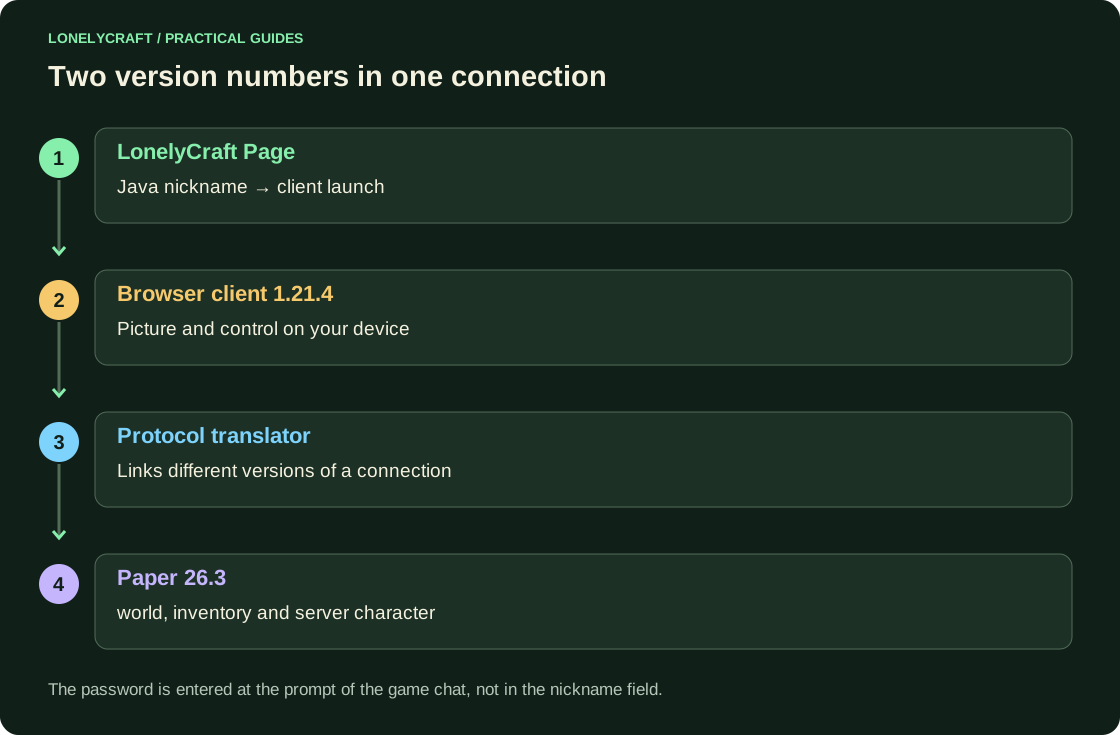
The game page launches a separate minecraft-web-client. It uses Java protocol 1.21.4; the server runs Paper 26.3, with a protocol translation layer connecting them. This does not downgrade the server or guarantee graphics identical to the desktop client.
The same Java nickname and a successful login use the same server character. A Bedrock/Xbox name and a Java nickname can identify different profiles; do not remove the Bedrock name prefix hoping to transfer progress. Minecraft Classic is a different browser project and does not connect to LonelyCraft.
From page to spawn
- Open /play/browser in a regular browser. When reporting unavailability, use “Check again” and save the error text if it persists.
- Enter Java nickname: 3–16 Latin letters, numbers or _. Click “Play in Browser” and wait for a separate tab or built-in client, depending on the available launch.
- If a server resource pack is offered, please download it for proper formatting. The first files may take longer to load than subsequent launches.
- Open chat T and execute the login command from the server prompt. For an existing account, this is /login with the game password; a new one is registered using the command shown. If 2FA is enabled, enter the code as prompted.
- Click on world, check WASD, jump, inventory and server menu. Login to the site's account is not required to launch.
Mouse and phone
WASD moves, Space jumps, E opens inventory and T opens chat. Click the game world to capture the mouse; Esc releases the cursor. If the camera does not move, close the menu and click the world again. Closing the game tab disconnects you; it does not delete server progress.
On your phone, rotate the screen horizontally and open the client in a separate window if the built-in area is inconvenient. Check out the onscreen buttons and chat on spawn. The presence of WebGL does not guarantee convenient touch control: the result depends on memory, browser and device.
Compare the browser with the regular Bedrock and the mobile Java client. Ways to play on your phone.
If the world is open but it's hard to play
Distinguish file loading from a low frame rate. For loading problems, leave one game tab open and check the connection. For low FPS, reduce the available view distance and graphics settings, close demanding apps and check device temperature. Do not install extensions claiming to “fix WebGL”.
If an item looks different, read its label first. When reporting a bug, include a screenshot, browser, device, time and the action you took, such as “the buttons disappeared after opening this menu”. You can continue a longer session in a regular Java client using the same nickname.
Check the edition and character identity when changing clients. Java and Bedrock.
