Find the exact world you are using
In Java, open Single Player → select world → Customize/Edit → Open world folder. If the interface is different, find saves inside the Game Directory of the current launcher installation. A mod profile can have a separate folder, not the general .minecraft.
Make a note of the Minecraft version, bootloader, required mods, and datapacks used. Then exit to the menu and close the game before copying. A copy of a running world can receive files from different save points.
Copy the entire directory
The folder should contain level.dat, region and other data, including playerdata, datapacks and measurement directories, if present. Don't just choose files with fancy names: individual UUID files store important information.
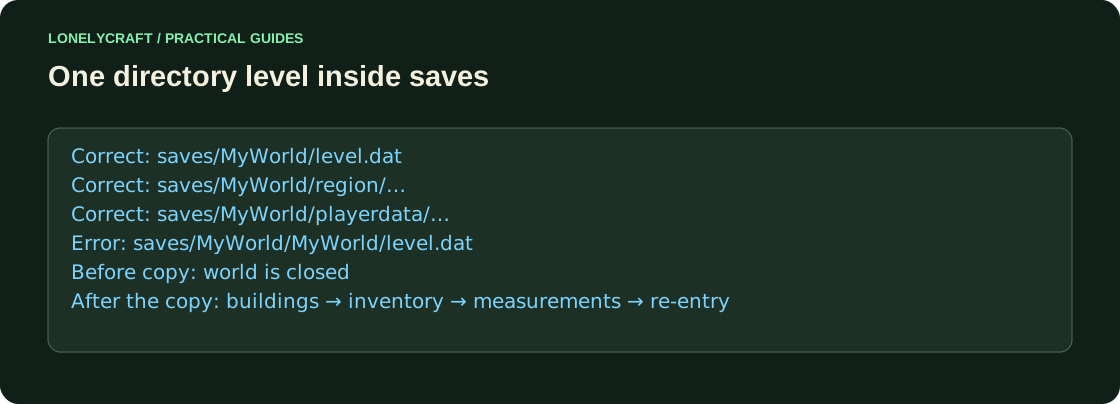
Pack the world directory into a ZIP and save the source separately. Wait for the entire archive to be transferred. On the new computer, unpack the desired profile into saves so that you get saves/MyWorld/level.dat, not saves/MyWorld/MyWorld/level.dat. An extra level of folders is a common reason why world is not in the list.
Open with a compatible assembly
Start with the same version and the same mandatory set of mods. Do not confirm opening in an older version as a normal migration step: saves are not guaranteed to be backward compatible. The update, if necessary, should be done separately on a copy of the already verified world.
For a mod build, transfer its configuration and exact versions of the projects. If the game is missing blocks or registers, stop before saving; Removing a missing mod is not neutral Mending.
Prepare the build without mixing mods from different installations. NeoForge Profile.
Check more than the spawn point
Find the base and remote building, check chests, personal inventory, Nether and End if they have already been opened. Install a test block, exit and open world again. Only after this can the transfer be considered complete.
If the character is different, check the account and identity, not just the spawn. Changing the client, online/offline profile or server UUID can show a different set of playerdata. Don't delete unknown UUID files at random; keep the original copy.
Find the missing dependency before opening the main world. Mod build errors.