Record six coordinates and measurement
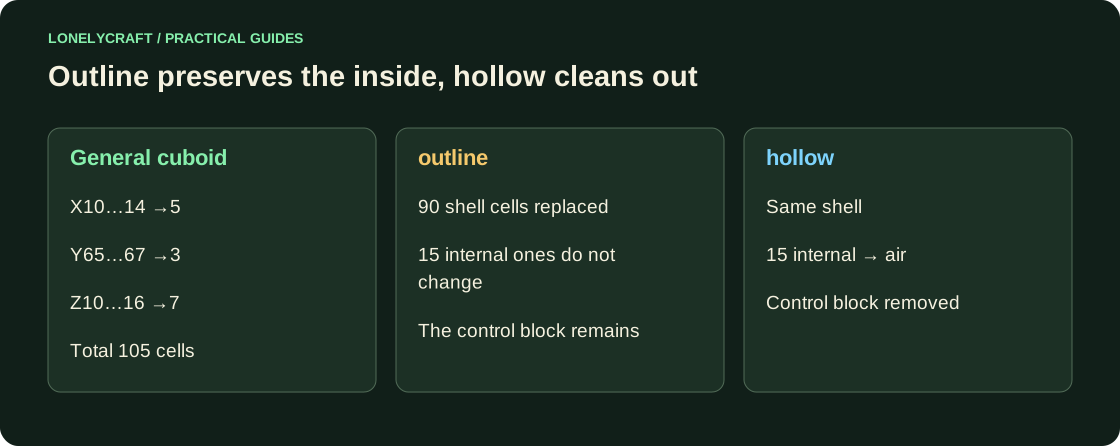
Each point uses X Y Z; the second coordinate is height. X10 through X14 includes five cells: 14−10+1. The corners (10,65,10) and (14,67,16) enclose a 5×3×7 volume. Absolute coordinates do not shift when the player moves.
Before working, save a copy of world next to your values. In vanilla Minecraft there is no general command undo for fill. Containers, water flows and updates to adjacent blocks are not returned by simply filling them with the same material.
First create two small samples
In a separate creative world, enable command and view the selected coordinates. Complete the lines one at a time. Basic stateless blocks are suitable for this experience in Java and Bedrock; For additional Bedrock form, check Microsoft fill.
The first line creates 25 stone tiles at y64. The second one changes only the shell of the box 5×3×7:105−3×1×5=90 positions. The internal 15 cells remain the same.
/fill 10 64 10 14 64 14 minecraft:stone
/fill 10 65 10 14 67 16 minecraft:glass outline
Compare outline and hollow on a test volume
Place a visible block inside the box, such as at (12,66,13). Repeat outline: the block remains. On a separate copy of the sample, replace the last part of the command with hollow: the inner 15 cells will become air. Don't try this in a crowded warehouse.
To replace only the ground in a flat area, use /fill 10 64 10 14 64 14 minecraft:stone replace minecraft:dirt; keep fills only air. The material filters the cells of the cuboid, rather than selecting the semantic object “track”. If command is rejected for size, check the number in the corners and server rules instead of accidentally raising the limit.
The editor's history has its own boundaries and does not replace a backup. Highlight and undo WorldEdit operations.
Before big changes, it is important to be able to return to the original world. Save a separate restore point.