Select according to your task
| Needed | First option | Limitation |
|---|---|---|
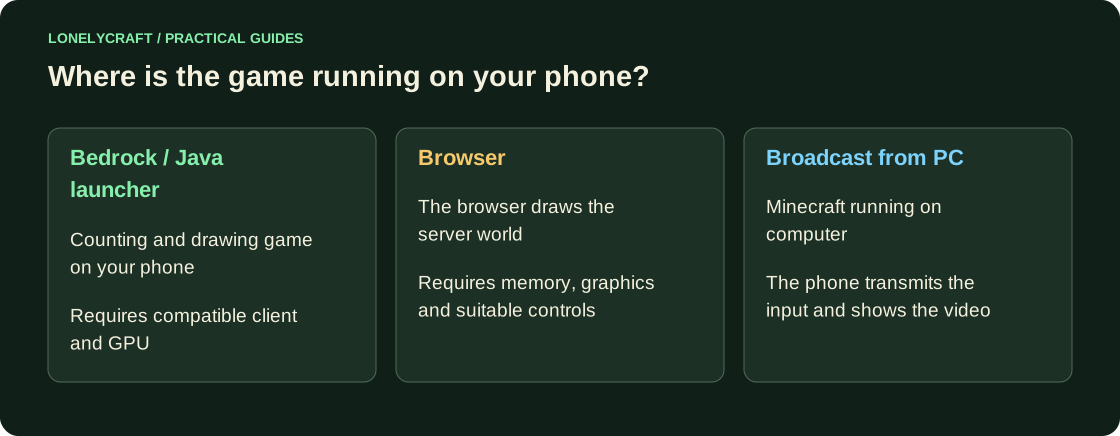
| Regular mobile Minecraft | Official Bedrock | Java mods won't install |
| Exact Java-modpack | Third party Java launcher | Runtime, GPU and build requirements |
| Quick login to LonelyCraft without installation | Browser beta | Test touch buttons and chat |
| Use the power of your PC | Remote broadcast | The game runs on PC; need a suitable network |
Bedrock: installation and first login
Open official download page and Android/iOS store. After installation, sign in to your Microsoft account for the online features you need. In Play → Servers → Add server, specify the address and port from LonelyCraft connection page, and not the Java port as usual.
Before a longer session, configure aiming, jumping, chat and interface size. A Java server with Bedrock support bridges the two editions; an ordinary Java server without that support cannot accept mobile Bedrock clients.
Find a diagram of a short route with a door and chests. Touch control.
Java on Android: Check out the author's project
Amethyst Android, Zalith Launcher 2 and Fold Craft Launcher are third-party projects for Java Edition. Use Releases and instructions for the selected project; The APK from the random repost does not confirm the origin.
After installation, start with vanilla Java without mods: check account login, the main menu, a small world and a multiplayer connection. Then add a supported mod loader. Do not copy an entire desktop Iris profile before checking the renderer: the mobile graphics path and driver can limit mods and shaders.
iPhone and browser: different conditions
Amethyst iOS requires installation procedure and JIT according to the author's documentation; Compatibility depends on iOS and launch method, sometimes you need a computer. This is not a normal installation of Java Edition from the App Store. Before choosing, check the entire process for your system version.
For browser play, open /play/browser, enter your Java nickname and test chat at spawn. If you previously used a Bedrock/Xbox name, this may be a separate Java server profile. With PC game streaming, the phone only displays the remote game: the world file and mods stay on the computer.
Step-by-step entry and mobile beta restrictions. Login via browser.