Before sharing the world
Check the edition and full version number. Match the modded Java assembly with the required mods. Regular Java LAN does not accept Bedrock from the phone. Participants must be on the same network without isolating clients; the same Wi-Fi name does not guarantee access if one is connected to the guest segment.
Java: Record current session port
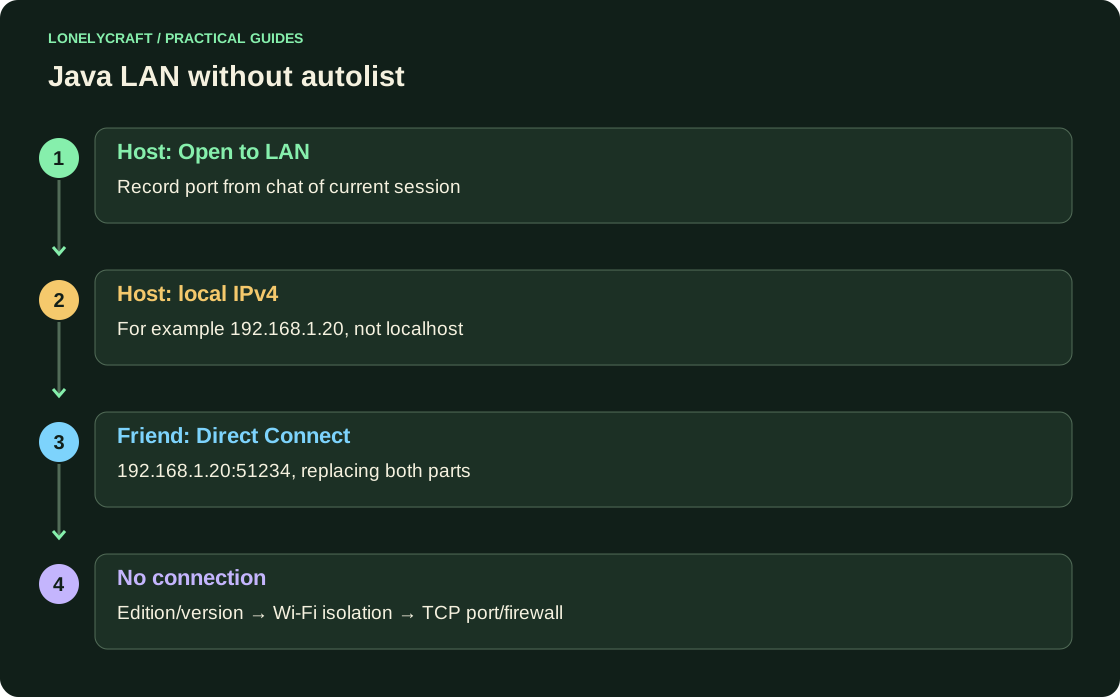
The owner opens his world → Esc → Open to the network / Open to LAN. Select the mode allowed for guests and command meaningfully, then open world. Write down the port that appears in the chat: for example 51234. This is an example, not a standard port for each LAN session.
On the host computer, find the local IPv4 of the active adapter via ipconfig in Windows or system network settings. The friend opens Online Play → Direct Connect and enters 192.168.1.20:51234, replacing both parts. localhost from a friend means his own device.
Once the world or client is closed, the session ends. When opening again, check the port again. In Java 26.2+ the permissions of the host and guests are separated in World Options/Open to LAN; Don't expect one switch to give everyone the same rights.
Bedrock: allow LAN in world
The owner opens the settings of the selected world → Multiplayer game and turns on the desired network game and visibility for LAN, if this item is available on the platform. The rest are looking for a local session in the friends/games section. The ability to play online also depends on your Microsoft account and its family settings.
If world is visible, but input is rejected, write down the exact error: version, network play rights and communication are different branches of the diagnostic. Don't try to fix a Java/Bedrock mismatch by opening a port.
If the connection fails
Temporarily compare both devices on a regular home network without VPN and guest Wi-Fi. Allow incoming gameplay connections in the private network firewall without disabling the entire firewall. For Java, check the current LAN TCP port, for a separate BDS, check the configured UDP port.
The owner has the storage; the guest's exit does not create a copy of world for him. Copy world after closing the game if you want to continue on another computer. For access without the host computer running, consider a separate server or Realms.
LAN solves the problem of a local network. Playing with friends from different cities.
Transfer the entire save if you change owners. Java-world port.