Check address, edition and version
In Java, open the server entry → Edit. Enter domain or domain:port, without https:// and /play. For Bedrock, the address and port are entered separately. Do not replace the game address with the website address.
Outdated client/server usually requires a compatible client, not a new DNS. For the bridge, check with the owner and Geyser manual. Support for a specific client is determined by the installed server configuration.
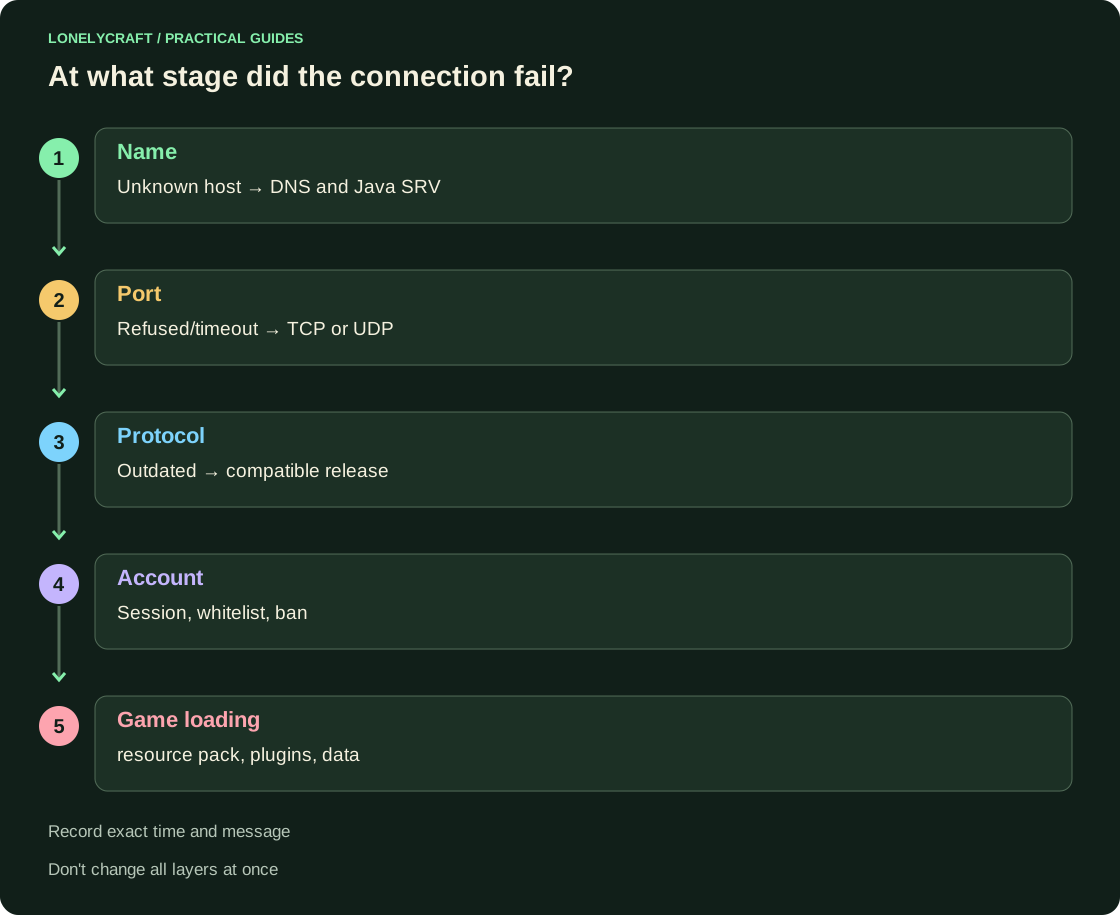
Unknown host: find out what the name resolves to
On Windows, run nslookup ВашДомен; on Linux getent ahosts ВашДомен will also work. Only the domain without the port is substituted. With Java SRV, additionally request nslookup -type=SRV _minecraft._tcp.ВашДомен: the actual name and port may be different.
If the name does not resolve, checking 25565 does not answer the question yet. If the old address comes back after moving, compare the A/AAAA and SRV with the owner's details. Connecting to a random IP can bypass an important route and check another server.
Refused and timeout: check the correct transport
In PowerShell, run the example below, replacing the domain and port. Microsoft Test-NetConnection shows TcpTestSucceeded; This is a TCP check, not a Minecraft login. On Linux with netcat: nc -vz -w 5 ВашДомен 25565.
Refused often means that the reached node is not accepting a connection on that port. Timeout leaves more reasons: route, filtering or unresponsive node. The owner should check localhost, LAN and external input separately, and not immediately change all the settings.
Test-NetConnection -ComputerName ВашДомен -Port 25565Connected but rejected: read the server’s message
Whitelist requires the owner to add your exact profile; a ban requires an application according to the server rules. If Failed to verify username, re-enter the official Launcher and repeat; For mass refusal, the owner checks the availability of account verification. Disabling online-mode is not a common fix for a single client session.
Bedrock uses UDP: TcpTestSucceeded does not accept this path. Geyser requires geyser connectiontest Адрес Порт and a real Bedrock client. To contact us, save the error text, time with time zone, version, edition and address; the administrator will compare them with the log. If the gap begins only after loading the resource pack, separately compare the clean profile and the required server set.
A running localhost decouples the server process from the external route. Check local Paper.
Geyser has its own transport and identification stage. Check Bedrock UDP.