Check the CommandPanels release before copying the YAML
Download the appropriate file from author's page, install it on the stopped test Paper and check the version against the log. Below is a diagram of a modern CommandPanels Quick Start: command /pa and separate YAML for the panel. Old /cp-configs with external panels have a different format.
In plugins/CommandPanels/panels, create welcome.yml in UTF-8. The file name welcome will become the name of the panel; an extra folder or .yml.txt extension will interfere with loading.
Make one safe button
Save the YAML below, restart the test server normally and run /pa open welcome. Pressing PAPER should send a message and not buy or teleport anything. This is a short test of the schema version, loading file and button action.
title: 'Помощь новичку'
type: 'inventory'
rows: 1
layout:
  4:
    - 'help'
items:
  help:
    material: 'PAPER'
    name: 'Первый шаг'
    left-click:
      commands:
        - '[msg] Откройте страницу правил и выберите режим игры.'
Design a route before expanding the window
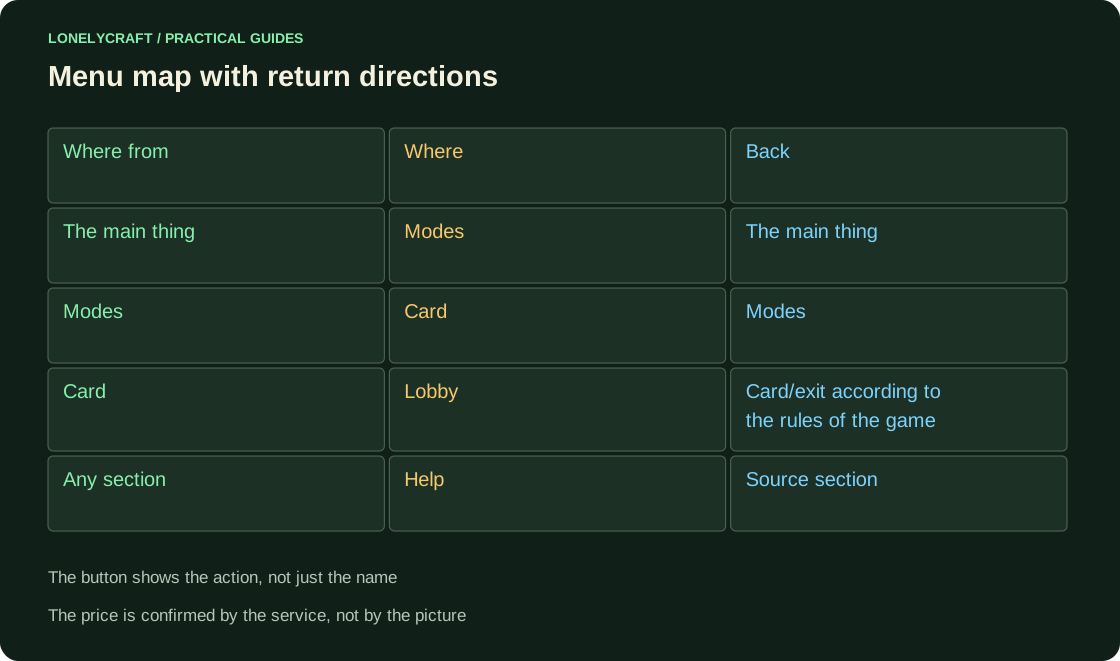
Write down the route table. For example: main → modes → mode card → lobby; help opens from the main page and the card, and “Back” returns you to the understandable previous level. Name the button according to its action: “How to play” and “Start round” perform different operations.
Publish access to the panel according to the rules of the established release and check without OP. Hiding a button does not replace the permission of the command itself. Executing from the console should also not turn any click into an administrative bypass.
| Screen | Click | Refusal/return |
|---|---|---|
| The main thing | Modes | Help is always available |
| Mode card | Start | Not ready → explanation and “Back” |
| Purchase Confirmation | Amount and currency | Insufficient → no write-off |
| Help | Specific Next Step | Back to original section |
Go through the same scenario in Java and Bedrock
On a regular account, open the menu, perform an action, go back, close Escape and find the entrance again. Repeat through every published source: command, NPC, hotbar item.
Inventory and Floodgate form are different types of panels. Do not transfer slot numbers to your phone as button numbers without checking. For paid action, experience double click, lack of money, cancel and full inventory. The price text must correspond to the transaction being confirmed.
Click, shift and drag require separate checks. Protect Java GUI Items.
Access to help is more important than the number of items on the first screen. Check out the beginner's first route.