Download the file for your client
Open Simple Voice Chat Issues and select the version of Minecraft you are running the game with, then select the bootloader - Fabric, NeoForge or another supported one. The core of LonelyCraft is Paper 26.3, but the mod file is needed specifically for your client version.
For the new Fabric profile, set Fabric Loader. If you are already playing with the build on a different bootloader, select the corresponding edition of Voice Chat; You cannot mix Fabric and NeoForge files in one profile.
Put the mod in the correct folder
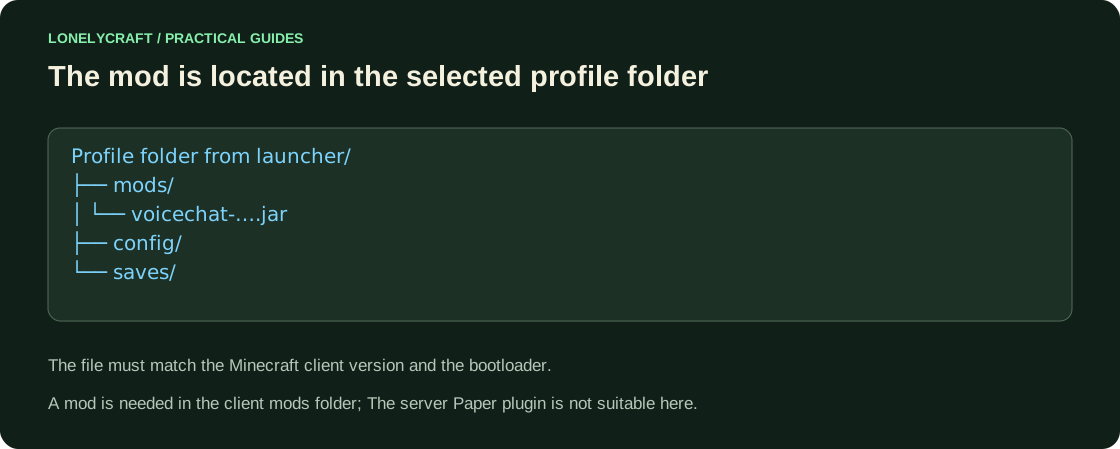
- Close the game. In the launcher, open the folder of the selected profile or assembly.
- Place the Simple Voice Chat client .jar in the
modsfolder. There is no need to unpack the archive; The server file for Paper in the client is not suitable. - Check the dependencies on the selected release page. When reporting an inappropriate Fabric Loader, update the loader rather than renaming the .jar.
- Launch the profile and click
V. The Voice Chat wizard or interface should open. If the key doesn't do anything, check your mod installation and key conflict.
Select the microphone and test push-to-talk
- In the
Vwizard, select your microphone and playback device. Check the microphone using the test from the settings. - Select Push to Talk mode and assign a dedicated button. By default, PTT is not linked: one press of
Vdoes not start a conversation. - Walk up to another player with the mod and check the speech by holding the assigned button. The usual range on the server is 16 blocks, whisper is 8.
- If you prefer voice activation, adjust the sensitivity threshold and check the mute after the wizard. The
Mkey controls the microphone in this mode.
No sound: find what is muted
| Symptom | Check |
|---|---|
| V does not open interface | Is the profile running the mod? Is there a key conflict in the control? |
| There is an interface, but the connection is not established | Voice uses a separate UDP connection. To contact support, save the icon/error and time. |
| Others hear you, but you don't hear them | Select the correct output device and check the volume in Voice Chat. |
| You hear others, they don’t hear you | Check microphone test, mute, activation mode and assigned PTT button. |
| Can't hear anyone after N | N completely disables voice chat in both directions. Click again if you want to turn it on. |
macOS permissions and the /free bonus
On macOS, the game requires microphone access. The author of the mod recommends launchers that support asking for permission, such as Prism Launcher; See macOS manual for details. If the device is visible in the system, but the test is silent, check this resolution first.
A voice is heard nearby, groups on LonelyCraft are disabled. If you need silence, use N, it turns off both transmission and listening. The bonus in /free is confirmed by a real Voice Chat connection to the server, and not just by the presence of a file in mods.
If you haven't created a profile yet, here are step-by-step instructions for Fabric. Installing Fabric and mods.
Where to see the fulfilled condition and collect the reward for the voice chat. Free rewards.